
While setting up a monorepo environment, I struggled with tsconfig configuration since it was my first time.
I initially turned to AI to generate the configuration. However, It produced a lot of unnecessary code, leaving me with many questions: “Given the context, why did the AI add this?” or “Is this setting truly essential for my project?”
This led me to deep-dive into the AI-generated code. Through this process, I gained a clear understanding of how the various tools in a monorepo build system interoperate. In this post, I’ll explain the essential tsconfig settings for monorepos and the reasoning behind them based on how the build system functions.
By reading this post, you will:
- Understand the essential
tsconfigconfiguration in monorepos - Learn how the modern application functions using variety of specialized tools
- Establish a solid standard for
tsconfigconfigurations in your own monorepo projects
The Structure
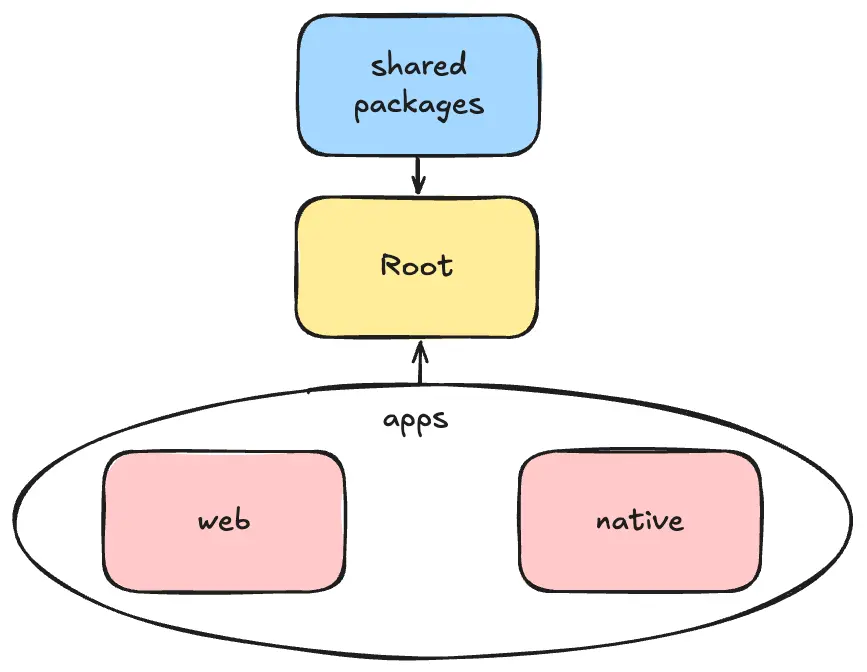
Most monorepo projects follow a typical structure, generally consisting of three primary components:
- Root
- Shared Packages
- Apps
The Root directory orchestrates the entire workspace, managing the relationships between packages and applications. Each App, in turn, consumes code from these Shared Packages to build its features.
Connect
Based on the structure we discussed, the fundamental concepts of a monorepo is “linking”. While Apps utilize code from various Shared Packages, the first step is to properly implement these connections.
In this context, “connecting” means enabling one project to consume code from another while maintaining their respective isolation.
But first, why do we need a formal “connection” instead of just importing source files directly? Importing raw source is equivalent to rebuilding every single packages from scratch every time you build your app. This is highly inefficient. Moreover, it violates the encapsulation; your application shouldn’t need to know the internal implementation details of a library. The same principle applies to our shared packages. Therefore, we must isolate each project and link them strategically.
references, path
{ "files": [], "references": [ { "path": "./apps/web/tsconfig.json" }, { "path": "./apps/expo/tsconfig.json" }, { "path": "./packages/tailwind-design-tokens/tsconfig.json" }, { "path": "./packages/tailwind-semantic-tokens/tsconfig.json" }, { "path": "./packages/ui/tsconfig.json" }, { "path": "./packages/locales/tsconfig.json" }, { "path": "./packages/i18n/tsconfig.json" }, { "path": "./packages/bridge/tsconfig.json" } ]}In the Root configuration, you define relationships between projects using the references and path properties. This system was introduced to solve several legacy build issues:
- Scalability: Compiling an entire TypeScript workspace as one giant project is inefficient and doesn’t scale.
- Dependency Management: Without references, managing type dependencies often resulted in “dirty” or brittle build scripts.
With the introduction of tsc -b (build mode) command, TypeScript can now build projects in the correct dependency order. It intelligently determines which projects need to be recompiled and in what sequence.
Additionally, the paths option allows you to define path aliases. For instance, you can map @myPackages/ to a specific folder, allowing both IDE and the compiler to resolve modules correctly without messy relative paths.
composite
// shared packages, apps tsconfig{ "compilerOptions": { "composite": true,
"declaration": true, // Required when composite is true "declarationMap": true }}Once you have defined which projects the Root will manage using references and paths, you must declare each sub-project as an independent unit.
This is achieved by setting composite: true in their respective tsconfig.json files.
Under the hood, composite: true automatically enables incremental: true, which is the backbone of incremental builds. In an incremental build, the compiler only processes the parts of the codebase that have actually changed. To facilitate this, TypeScript generates a .tsbuildinfo file, which serves as a metadata cache for the build process.
When you run tsc -b, the compiler leverages these .tsbuildinfo files to perform “Smart Caching”. The true power of smart caching lies in its ability to detect whether a change is “meaningful.” Even if the internal implementation of a file changes, as long as the resulting types (the public API) remain identical, the compiler skips recompiling the dependent projects. This significantly reduces build times in large monorepo environments.
declaration, declarationMap
We also need to link the types across the workspace. For instance, when you write the code in your app that interacts with shared packages, your IDE cannot resolve function parameters or types without proper metadata.
This is precisely where the declaration and declarationMap configurations come into play.
{ "compilerOptions": { // ... "composite": true,
"declaration": true, "declarationMap": true }}declarationMap generates .d.ts.map files, which act as a bridge between generated type definitions and the original source code. This ensures that when you trigger “Go to Definition”, you jump directly to the .ts source files rather than a read-only declaration file.
With this, our “connection” phase is complete. Each project has now established clear boundaries, and the Root is fully equipped to manage the entire dependency graph.
The Role of Tools
Now that we’ve established the connections, we’re ready to build. However, there is a catch: the TypeScript Compiler (TSC) is often overloaded with too many responsibilities. By default, tsc handles both type checking and transpilation (converting individual .ts files into .js files). It is important to note that tsc is not a bundler; it simply generates a corresponding .js file for every .ts file.
Because tsc performs both tasks, it can become a performance bottleneck. To address this, modern build pipelines decouple these roles. We leave type checking to tsc - as it’s the only tool that can do it accurately - while offloading transpilation to high-performance tools like SWC or Babel, which are significantly faster.
noEmit
This principle applies directly to monorepo environments. Since each application (Web, Native) utilizes its own specialized transpiler, we must configure tsc to skip the transpilation process. By default tsc attempts to convert all .ts files into .js, but setting noEmit: true instructs the compiler to perform type checking exclusively without generating any output files.
{ "extends": ["expo/tsconfig.base"], "compilerOptions": { "composite": true,
"noEmit": true // ... }, "include": [ // ... ], "exclude": [ // ... ]}noEmit: truemeanstscwill not transpile the code, and therefore will not emit any.jsfiles.- In other words,
tscfocuses exclusively on type checking.
- In other words,
However, what about “Shared Packages”? These are essentially standard JavaScript files and do not have their own transpilers. Additionally, consuming apps should not have to transpile these packages during their own build time (as I explained earlier). Therefore, they need to be configured with noEmit: false.
{ "compilerOptions": { // ... "composite": true,
"declaration": true, "declarationMap": true,
"noEmit": false }}By doing so, shared packages emit both .js and .d.ts files to finalize the build process.
Problems from differentiation between tsc and tools
Previously, we restructured our build process by offloading the transpilation task from tsc to other tools like SWC or Babel. However, this separation of concerns introduces several issues due to the fundamental differences in how tsc and these transpilers operate.
isolatedModules: true
Before diving in, it is essential to understand the difference in how TSC and other transpilers handle code.
TSC performs project-wide analysis, recursively resolving every import to ensure type safety.
While thorough, this process is inherently slow. In contrast, modern transpilers focus on single-file transformation, simply stripping away TypeScript-specific syntax.
While this makes them significantly faster, it comes with a trade-off: because they process files in isolation, they often struggle with ambiguous type imports, as they cannot determine a file’s output without context.
import { UserType } from "./UserType";For instance, if a file exports a type and the transpiler fails to recognize it as such, it might erroneously leave the type reference in the output. This results in invalid syntax in the final bundle that browsers cannot execute, leading to runtime errors. Enums present similar challenges.
To prevent this, you should enable isolatedModules: true.
{ "extends": ["expo/tsconfig.base"], "compilerOptions": { "composite": true,
"noEmit": true,
"isolatedModules": true // ... }, "include": [ // ... ], "exclude": [ // ... ]}This option restricts the conventions that can lead to potential errors. In the “type” problem case, the option generates an error unless you write like this:
import type { UserType } from './UserType';This flag enforces a stricter coding style by flagging syntax that could cause issues during single-file transpilation. For example, it requires you to use explicit type-only imports, like import type { UserType } from './UserType'. This gives the transpiler a clear signal to strip the import, ensuring the browser receives clean, executable JavaScript.
moduleResolution: bundler
The next challenge lies in how TSC resolves file paths. Modern bundlers typically allow us to omit file extensions, but TSC’s default logic often fails to locate these files.
Furthermore, modern bundlers support the exports field in package.json—a convention TSC’s older resolution strategies might overlook.
{ "extends": ["expo/tsconfig.base"], "compilerOptions": { "composite": true,
"noEmit": true,
"isolatedModules": true, "moduleResolution": "bundler" // ... }, "include": [ // ... ], "exclude": [ // ... ]}Setting moduleResolution: "bundler" resolves these issues by aligning TSC’s lookup logic with that of modern bundlers, enabling seamless support for extensionless imports and complex package exports.
Conclusion
Setting up a monorepo is complex, but these three flags—noEmit, isolatedModules, and moduleResolution: "bundler"—are the foundation. By separating type-checking from transpilation, you gain both speed and safety. Focus on these, and your build system will stay scalable.